


How to Stop Your Car’s Bluetooth From Disconnecting Mid-Drive
June 12, 2026
Key Highlights:
● Car Bluetooth disconnections are a common frustration for parents on the go.
● Updating firmware and resetting connections often resolves most Bluetooth issues.
● Physical interference and multiple paired devices can disrupt stable connections.
● Simple in-car habits, like keeping phones close to the head unit, improve reliability.
● Following a structured troubleshooting routine saves time and stress while driving.
Estimated Reading Time: 12 minutes┃Post by: Jordan Avery
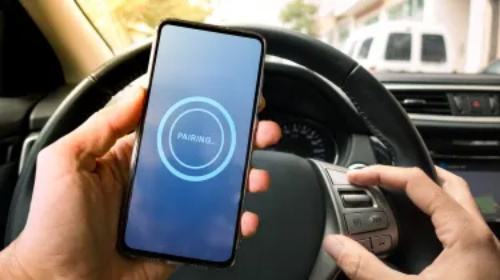
Bluetooth connectivity inside vehicles is designed to be seamless, but in real-world conditions it often behaves unpredictably. A parent driving to school drop-off may experience perfect audio at first, only for the connection to abruptly cut out halfway through a call or playlist. Navigation prompts disappear, calls drop into speakerphone, and the infotainment screen appears frozen or “connected but silent.”
This issue is rarely random. In most cases, car Bluetooth disconnections are the result of layered technical constraints: firmware mismatches, signal interference, device overload, and system memory limitations. Understanding these causes in practical terms allows you to fix the issue permanently rather than repeatedly reconnecting your phone every few days.
Why Car Bluetooth Instability Happens in Real Driving Conditions
Bluetooth in cars operates on the 2.4 GHz frequency band, which is shared with Wi-Fi routers, wireless chargers, dash cameras, and even some USB accessories. Inside a moving vehicle, this creates a dense and unstable signal environment.
A simplified breakdown of instability sources:
Table 1: Real-World Causes of Bluetooth Dropouts
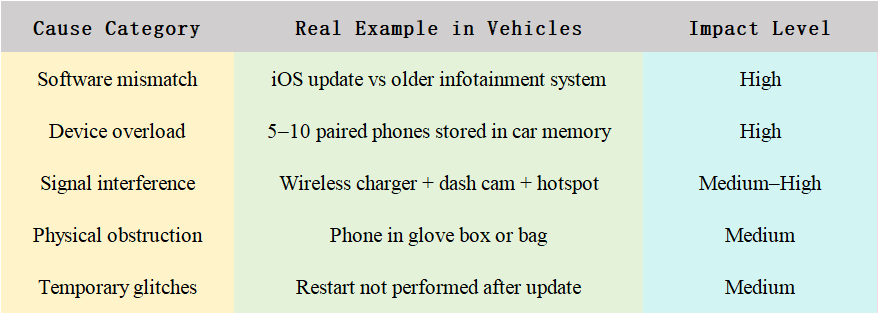
Research and automotive troubleshooting data consistently show that corrupted pairing data and outdated firmware are among the most common triggers of mid-drive disconnects, often more than hardware failure itself.
Firmware Mismatch: The Hidden Compatibility Problem
One of the least obvious but most important issues is version incompatibility between your smartphone and your car’s infotainment system.
Modern phones typically use Bluetooth 5.0–5.3, which prioritizes low energy usage and fast reconnection. Many older vehicles still rely on Bluetooth 4.0 or earlier implementations embedded in infotainment systems that were never designed for frequent OS updates.
When these systems communicate, they negotiate a “common protocol.” If that handshake fails intermittently, you get symptoms such as:
● Music plays but calls drop
● Connection shows “active” but no audio routes
● Random disconnects during app switching
● Delayed reconnection after ignition restart
This mismatch is especially visible after phone OS updates or infotainment firmware updates that are not synchronized.
The “Corrupted Pairing” Problem (Most Common Failure Point)
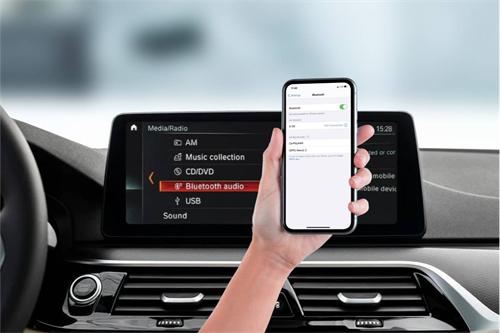
Car Bluetooth systems store pairing profiles locally. Over time, these profiles become outdated, duplicated, or partially corrupted.
A typical vehicle might store:
● Your phone
● Your partner’s phone
● Old devices from previous owners
● Rental car profiles
● Temporary connection cache
When this list becomes unstable, the infotainment system may still show “connected,” but the actual data channel breaks silently. This pattern strongly indicates corrupted pairing memory rather than signal strength issues.
Practical fix: full deletion on both devices (car + phone), followed by clean re-pairing. Partial resets (phone only) often fail.
Device Overload: Too Many Connections at Once
Many drivers unknowingly allow multiple devices to auto-connect:
● Primary phone
● Work phone
● Passenger devices
● Tablets
● Smartwatches
● Car hotspot connections
Infotainment systems have limited “Bluetooth session memory.” When exceeded, they begin prioritizing or dropping connections unpredictably.
Table 2: Typical Device Load vs Stability
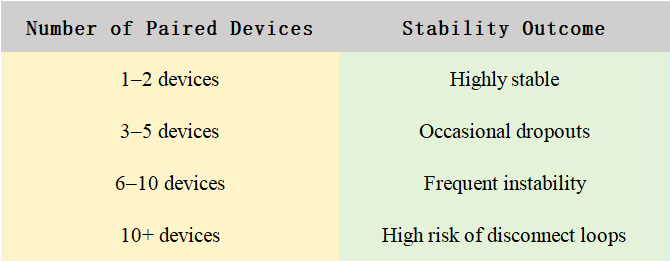
Automotive diagnostic summaries indicate that excessive paired-device storage can overload system memory and create unstable connection behavior .
Physical Interference Inside the Car
Bluetooth signals are short-range but highly sensitive to obstruction. Inside a car, multiple surfaces affect signal quality:
● Metal dashboard structures
● Center console shielding
● Seat positioning
● Wireless charging pads
● USB 3.0 cables emitting interference
Even something as simple as placing a phone in a cup holder next to a metal bottle can degrade signal stability.
Placement impact model
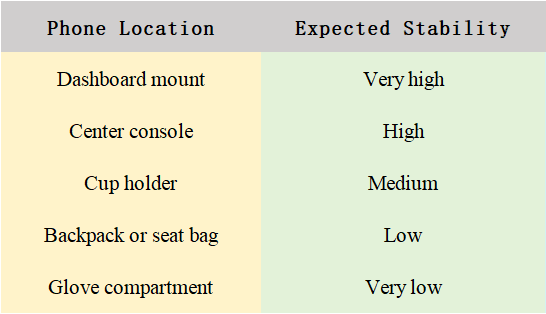
Studies show that direct line-of-sight placement can improve connection reliability significantly compared to obstructed placement inside compartments .
Interference From Other Wireless Systems
Modern cars are increasingly “wireless ecosystems.” A single vehicle may contain:
● Wireless Apple CarPlay / Android Auto
● Bluetooth audio streaming
● Wi-Fi hotspot
● Tire pressure sensors
● Dash cameras
● Radar detectors or navigation devices
All of these compete for the same frequency band.
In dense urban driving environments, interference increases further due to external Wi-Fi networks and surrounding vehicles.
Stabilization Process
structured reset process. This involves deleting the car from the phone’s Bluetooth settings, deleting the phone from the car’s system, restarting both devices, and then re-pairing them from scratch. This process clears corrupted connection data and forces a fresh handshake between systems. In many real-world cases, this alone resolves recurring disconnect problems without any further intervention.
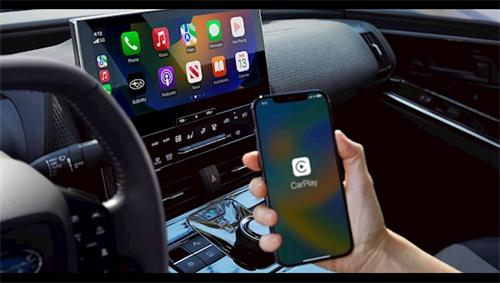
After resetting, it is important to rebuild the connection in a controlled environment. The vehicle should be stationary, and the phone should be positioned close to the infotainment system during pairing. Once the connection is stable, it is advisable to limit the number of paired devices and disable auto-connect on secondary phones or tablets. This reduces system load and prevents unexpected device switching while driving.
In some cases, persistent disconnections may indicate deeper issues related to firmware or hardware. Infotainment modules can degrade over time, especially in older vehicles. Symptoms of hardware-related issues include identical problems across multiple phones, worsening performance over time, or failure even after a full reset. When this happens, professional diagnostic testing is often required to determine whether the Bluetooth module or antenna system is malfunctioning.
Car Bluetooth instability is rarely a single-point failure. It is usually a combination of software mismatch, overloaded pairing systems, and environmental interference. The key to a stable connection is not just “fixing Bluetooth,” but systematically reducing complexity inside the vehicle’s wireless environment.
(This article is provided for informational purposes only. Bluetooth behavior varies across vehicle models, smartphone operating systems, and firmware versions. Always consult your vehicle manufacturer or a certified technician for persistent hardware-related issues. The author assumes no responsibility for device malfunction resulting from improper configuration changes.)
FAQs
1. My car disconnects only when driving over 50 mph. Why?
High speeds can slightly reduce Bluetooth signal strength due to interference from vehicle design or external radio frequencies. Placing your phone closer to the dashboard often resolves this.
2. Can multiple phones connected at once cause permanent system damage?
No, but it increases the risk of frequent dropouts and can confuse your car’s pairing memory, requiring a reset to restore stability.
3. Are wired connections better than Bluetooth for parents?
Wired connections are generally more stable but less convenient. Bluetooth allows hands-free calls and navigation, which is often essential during busy parenting routines.
About Author
Jordan Avery is a technology writer and parenting coach with over a decade of experience helping families integrate modern tech into everyday life. Jordan specializes in practical solutions for parents balancing busy schedules with digital convenience.
References
CarTreatments. (2026). Car Bluetooth not working: Common causes and fixes.
Lithe Audio Support. (2026). Why does my Bluetooth connection keep disconnecting?
Tech9 Auto Repair. (2026). Why does my Bluetooth car adapter keep disconnecting?
Recommended for you: